
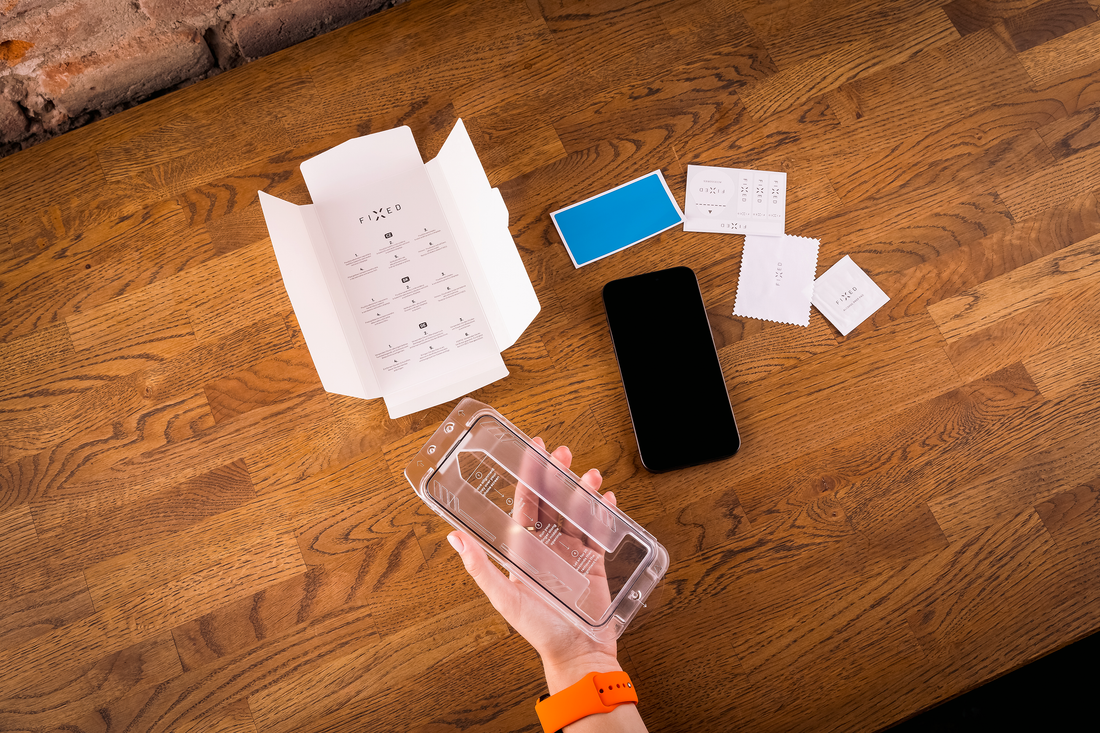
Applying tempered glass to your phone may seem complicated at first, but believe me, it will be a breeze after reading our instructions. We will show you how to properly apply FIXED glass protectors to iPhones, as well as Samsung and Xiaomi phones.
How to stick glass on your phone without bubbles
Below, we describe in detail the steps to ensure that you can stick the tempered glass without bubbles, which sometimes appear between the glass and the display during application.
Further in the article you will also find instructional videos for each brand.
- Before you start gluing the safety glass, thoroughly degrease the display with a damp cloth and check that there is no dirt on it.
- If you are using a phone case , remove it before gluing the glass.
- Wipe the phone screen with a dry microfiber cloth.
- Take a dust sticker (in the case of FIXED glass, it is included in the package, as well as a damp cloth and a microfiber cloth) and use it to remove all dust from the display. You don't have to do this if you have our glass with an anti-dust applicator.
-
The next step depends on the type of glass you purchased:
- If it is a glass with an advanced anti-dust applicator, then just place the phone in the applicator, pull out the anti-dust foil from below, which will ensure perfect cleaning, and then press the glass onto the phone's display. Thanks to the applicator, the glass aligns itself and sticks precisely and without bubbles.
- Do you have a glass with an application frame? In that case, put this frame (it is made exactly to measure for your mobile phone) on your phone. Remove the protective glass from the carrier card and insert it with the adhesive side into the applicator on the phone's display.
- If you have a basic type of protective glass, then the package does not include an applicator. Remove the glass from the protective card and align it as precisely as possible with the top edge of the phone . The glass needs to be glued straight so that when light is refracted on the sides, white stripes from the adhesive do not appear. Slowly fold the glass onto the display and check that it is glued evenly along all edges and does not overlap anywhere.
- Then, run your fingertip over the glass (from top to bottom). This will gradually stick the glass to the entire surface, all the way to the edges of the display.
How to stick tempered glass on iPhone
Below you will find a video tutorial with the exact procedure for properly attaching the FIXED cover glass to your iPhone.
We recommend using the extra durable FIXED Armor protective glass , which has up to 30% more flexibility and 2x higher resistance than regular glass. It can handle bumps, falls and scratches. It is also equipped with an anti-reflective coating, reducing light reflectivity (thanks to which the display is easily readable even in direct sunlight) and an anti-fingerprint layer (thanks to which fingerprint smudges do not remain on the glass, so it stays clean longer).
We also offer FIXED Armor tempered glass with a so-called anti-dust applicator , which removes dust and other impurities from the phone's display. Then you place your phone into the applicator, which is precisely tailored to your model. Then, in one move, you stick the glass exactly where it belongs, without the need to wipe off the dust.
How to stick a cover glass on a Samsung phone
We also have a video for you with the procedure for applying protective glass on Samsung phones (for example, Samsung Galaxy A16 or Samsung Galaxy A06 ).
Do you need to stick tempered glass on your Samsung Galaxy S? The procedure is specific to this model, you can find instructions here .
Instructions for sticking a protective glass for Xiaomi
Protective glass for smartphones from Xiaomi (for example, the Xiaomi Redmi Note 14 5G model ) is also popular and widespread, so we also have a video tutorial for this brand.
For Xiaomi and Samsung mobile phones , clear tempered glass (the same size as the display) or tempered glass with a black frame (covers both the display and the frame on the edges of the smartphone) is ideal, as it is more resistant to falls and impacts.
The most common mistakes when sticking a protective glass on a phone
To make sticking FIXED protective glass as easy as possible, also take a look at common mistakes that are worth avoiding.
-
Do not leave the glass on for too long to prevent dust from settling on the display again after cleaning.
-
Once you stick the glass, try not to peel it off again (it reduces adhesion).
-
Be careful not to let the glass cover the microphone or front camera.
Frequently asked questions about bonding tempered glass
Is it possible to re-glue tempered glass?
If you stick the glass crookedly on the first try, it is a good idea to immediately peel it off gently and re-align it. This is usually no longer possible after full pressure or after a longer period of time.
What if bubbles form around the edges under the safety glass?
Just press the bubble area with your fingertip and slide your finger towards the edges of the phone.
What if a speck of dust remains under the glass after it has been glued?
The glass can still be peeled off and the dust removed with the small sticker provided. This needs to be done now, as the glass will not be so easy to peel off later.
Does it make sense to stick tempered glass if I'm already using a phone case?
Yes. The case mainly protects the sides and back of the phone, but the display is protected by tempered glass.
If you need advice on applying glass or anything else, don't hesitate to write to us in the chat here on the website .